
| Exam Code | AD01 |
| Exam Name | Blue Prism Accredited Developer |
| Vendor | Blue Prism |
| Total Questions | 189 |
| Last Updated | 26-Oct, 2026 |
- Latest & Verified Questions
- Detailed Explanations
- Regular Updates
- Full-Length Practice Tests
- Boost Your Exam Confidence
PDF Study Materials
Downloadable guides and resources
Practice Tests
Full-length tests with real exam experience
Progress Tracking
Monitor your performance and improvement
Study Anywhere
Access on desktop, tablet, and mobile
Free AD01 Practice Questions
Explore 6 free practice questions for the Blue Prism AD01 exam and review the answers and explanations to support your preparation.
-
Question 1
Multiple answersThe Process Controller needs to be able to view Exception items from both the Work Queue screen within the Control room, and from the Session Logs According to best practice, which TWO options would the Developer recommend?
-
Option A:Correct
Use the column filters available within Blue Prism Settings > Audit > Process Log settings
-
Option B:Correct
Call the Exception Stage details and tag them to the Item prior to Mark Item as Exception
-
Option C:Correct
Loop through the Work Queue items in Exception and tag with the Exception Details
-
Option D:Correct
Use the Scan Processes feature within the Blue Prism Settings > Exception Type to identify items
-
Option E:Correct
Show Answer & Explanation Hide Answer & Explanation
Correct Answer: B, E
Explanation
Tagging Exception Items :
By calling the Exception Stage details and tagging them to the item before marking it as an exception, it ensures that detailed information about the exception is captured and can be viewed later. This helps in identifying the cause of the exception and provides valuable context.
Stage Logging :
Enabling stage logging within each exception properties ensures that all exception details are logged. This allows the Process Controller to view detailed exception information from the session logs, providing a comprehensive view of what went wrong.
Benefits :
These two approaches ensure that exception details are both tagged to the work queue items and logged in the session logs, making it easier for the Process Controller to review and analyze exceptions from different interfaces within Blue Prism.
References :
Blue Prism documentation on exception handling, tagging, and logging.
-
-
Question 2
Multiple answersWhich of the following can you perform in me System - > Workflow area of Blue Prism? (select all that apply)
-
Option A:Correct
View the contents of a Work Queue
-
Option B:Correct
Refresh a Work Queue
-
Option C:Correct
Encrypt a Work Queue
-
Option D:Correct
Show Answer & Explanation Hide Answer & Explanation
Correct Answer: C, D
-
-
Question 3
Single answerA Blue Prism Process works successfully when testing in the Process Studio but terminates in Control Room due to the exception stating screen elements were not found What should the Developer check first?
-
Option A:Correct
The correct Spy mode was used to identify elements
-
Option B:Correct
Application Modeller has a unique match for the screen element
-
Option C:Correct
Wait Stages have been used effectively
-
Option D:Correct
Show Answer & Explanation Hide Answer & Explanation
Correct Answer: A
Explanation
Spy Mode :
Blue Prism uses different spy modes (e.g., Win32, HTML, Region, etc.) to interact with various types of applications and elements within those applications.
Testing in Process Studio vs. Control Room :
A process may work in Process Studio because elements are correctly identified during testing, but it may fail in Control Room if the wrong spy mode was used, leading to elements not being found in the live environment.
First Check :
Verify that the correct spy mode was used to identify the screen elements. This ensures that the process can reliably locate and interact with these elements during runtime.
References :
Blue Prism documentation on spy modes and element identification.
-
-
Question 4
Single answerA screen contains four buttons, Find, Save, Close and New. When the buttons are spied, the attributes are identical except for the Window Text attribute.
The values for the Windows Text attribute are Find ' for the Find button. ' Save ' for the Save button, Close ' for the Close button and New’ for the New
Button.
The Dynamic Button element has been spied and has the following attributes set:
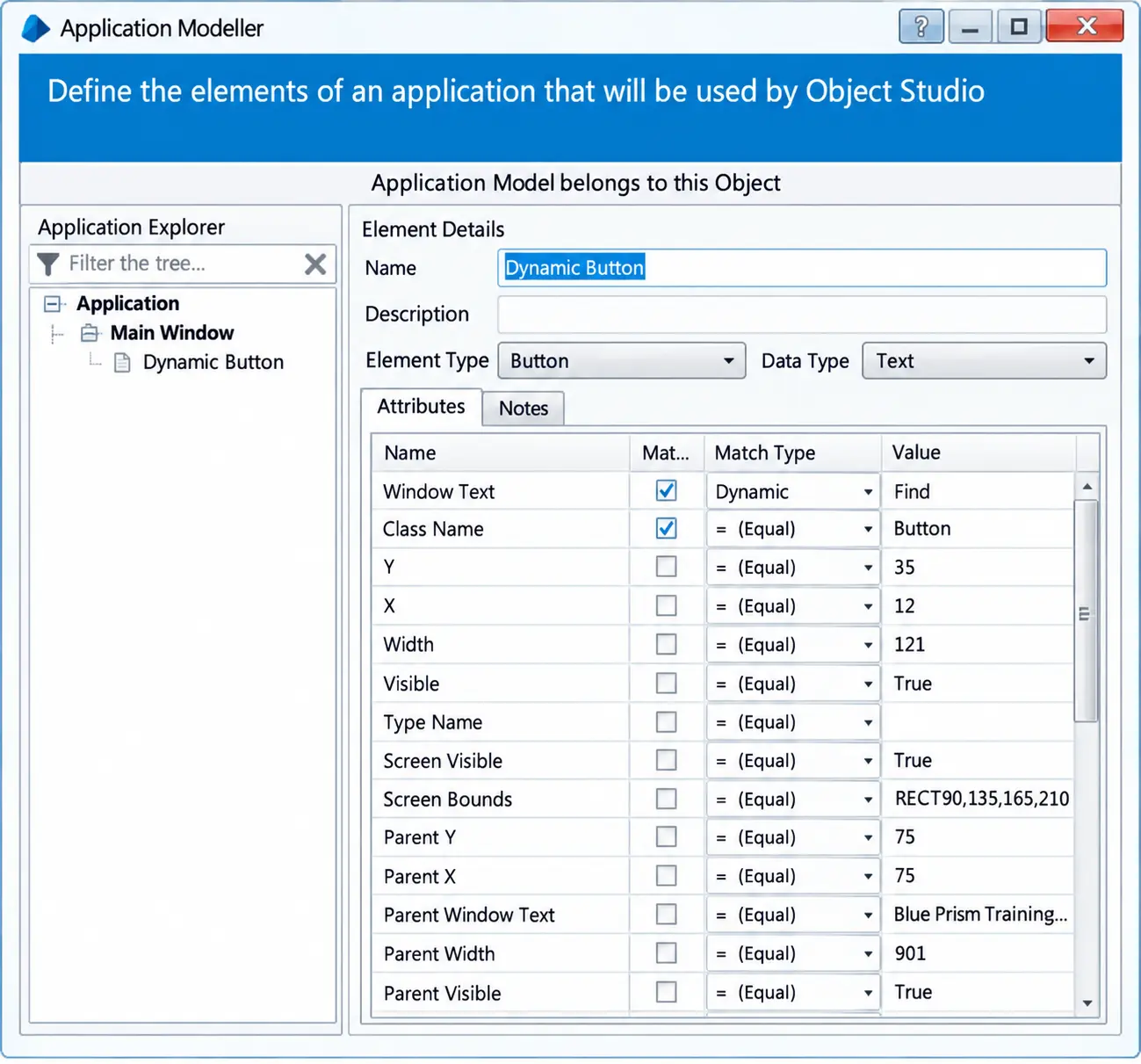
What additional configuration is required to ensure the Close button is selected by the Navigate stage?
-
Option A:Correct
Set the Mouse Button value to Close '
-
Option B:Correct
The Params button must be selected and the parameter configured to override the Window Text attribute value to ' Close '
-
Option C:Correct
It is not possible to select the Close button using the Dynamic Button element because the value is set to ' Find in the Application Modeller
-
Option D:Correct
Show Answer & Explanation Hide Answer & Explanation
Correct Answer: B
Explanation
Reason: When passing the values in the Parameter the parameter should be configured with respect to the window text and pass as the value “close” as other attributes are identical we only have window text to make our fingerprint unique.
-
-
Question 5
Single answerStudy the following process flow on the Main Page of a process where the intention is to preserve the current exception.
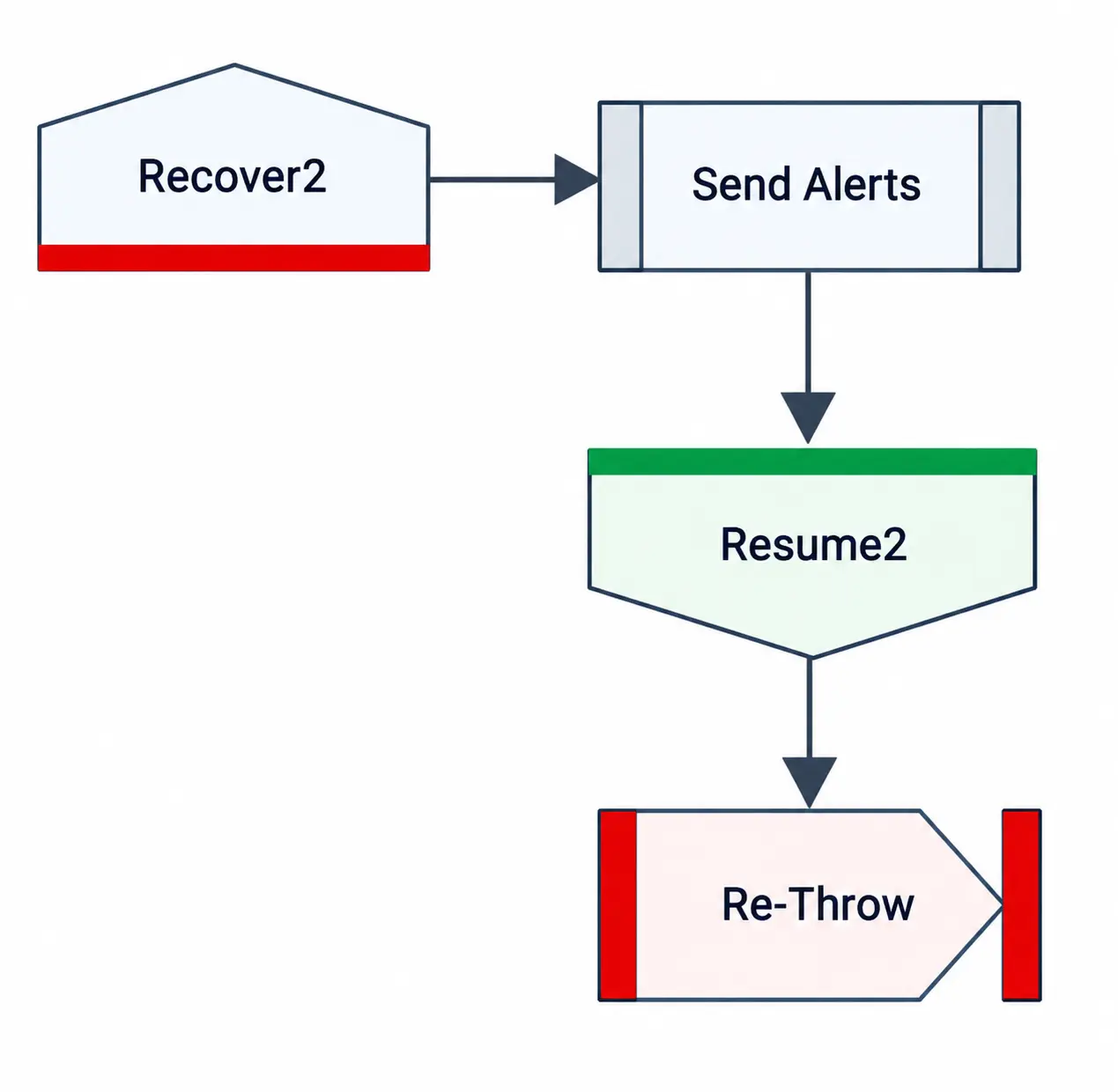
What is wrong with the design?
-
Option A:Correct
The exception handling is not within an Exception Block.
-
Option B:Correct
The exception caught by Recover2 will not be preserved by the Re-Throw Exception stage
-
Option C:Correct
The Send Alerts process will never be run
-
Option D:Correct
Because the flow is on the Main Page of the process there should not be a ‘Re-Throw ' Exception stage as there are no parent/calling pages for the exception to bubble up ' to.
Show Answer & Explanation Hide Answer & Explanation
Correct Answer: B
Explanation
Reason: After resume stage the exception is dead so the Re thrown will not worked.
-
-
Question 6
Single answerA Developer has a number of cases which need to be loaded into a Work Queue. The source data collection contains a field to indicate the customer account type as either Business, Personal or Joint Which method should the Developer use to ensure that the Business Customer cases are worked first?
-
Option A:Correct
Set the priority of each Business Case to " 0 " . set the Priority of all other cases to " 1 "
-
Option B:Correct
When populating the Work Queue set the Tag as Work Queues > Add to Queue > Tag = ' ^Business '
-
Option C:Correct
Set the priority of each Business case to T, set the Priority of all other cases to ' 0 "
-
Option D:Correct
Show Answer & Explanation Hide Answer & Explanation
Correct Answer: A
Explanation
Understanding Priorities :
In Blue Prism, work queue items with a lower priority value are processed before those with a higher priority value.
Setting Priorities :
To ensure that Business Customer cases are worked first, the priority for these cases should be set to the lowest value.
For Business cases, set the priority to " 0 " .
For all other cases (Personal and Joint), set the priority to " 1 " .
Implementation :
While adding items to the work queue, use the Add to Queue action to set the priority.
Ensure Business cases have priority " 0 " and others have priority " 1 " .
References :
Blue Prism documentation on work queue priorities
-