
Exam Overview
| Exam Code | XK0-004 |
| Exam Name | CompTIA Linux+ (Plus) |
| Vendor | CompTIA |
| Total Questions | 483 |
| Last Updated | 26-Oct, 2026 |
Why CertsPoint?
- Latest & Verified Questions
- Detailed Explanations
- Regular Updates
- Full-Length Practice Tests
- Boost Your Exam Confidence
PDF Study Materials
Downloadable guides and resources
Practice Tests
Full-length tests with real exam experience
Progress Tracking
Monitor your performance and improvement
Study Anywhere
Access on desktop, tablet, and mobile
Secure Payment
Privacy Protected
Money Back Guarantee
Free XK0-004 Practice Questions
Explore 5 free practice questions for the CompTIA XK0-004 exam and review the answers and explanations to support your preparation.
-
Question 1
Drag & DropDRAG DROP
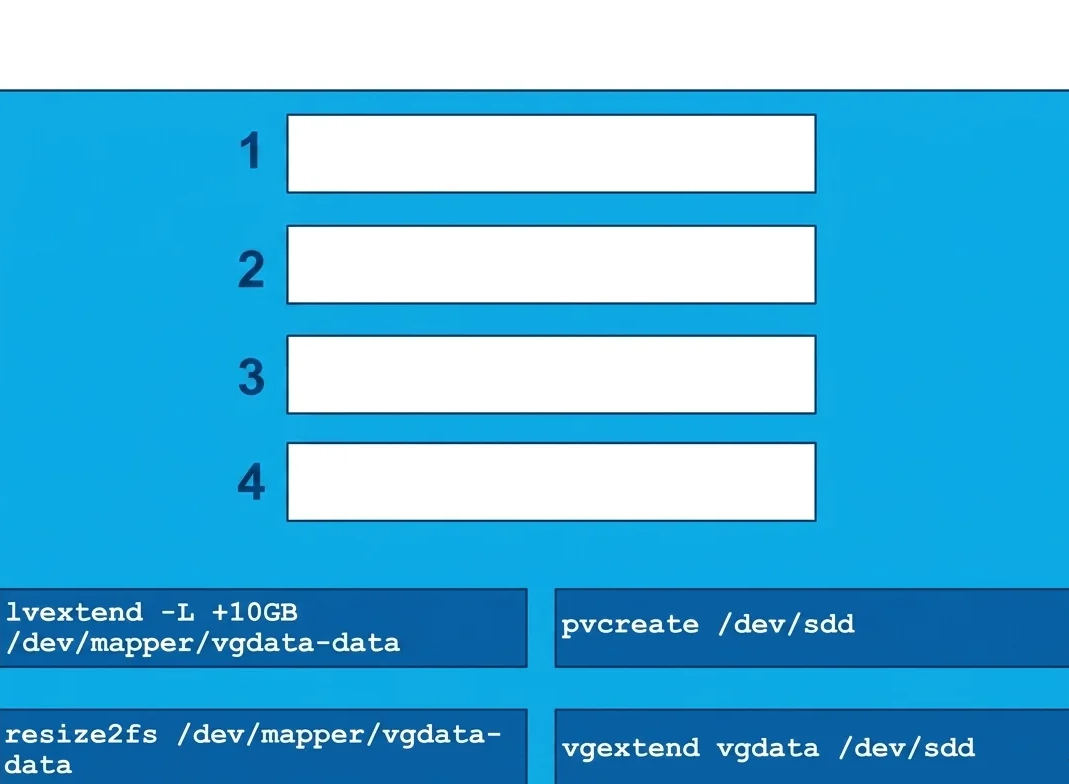
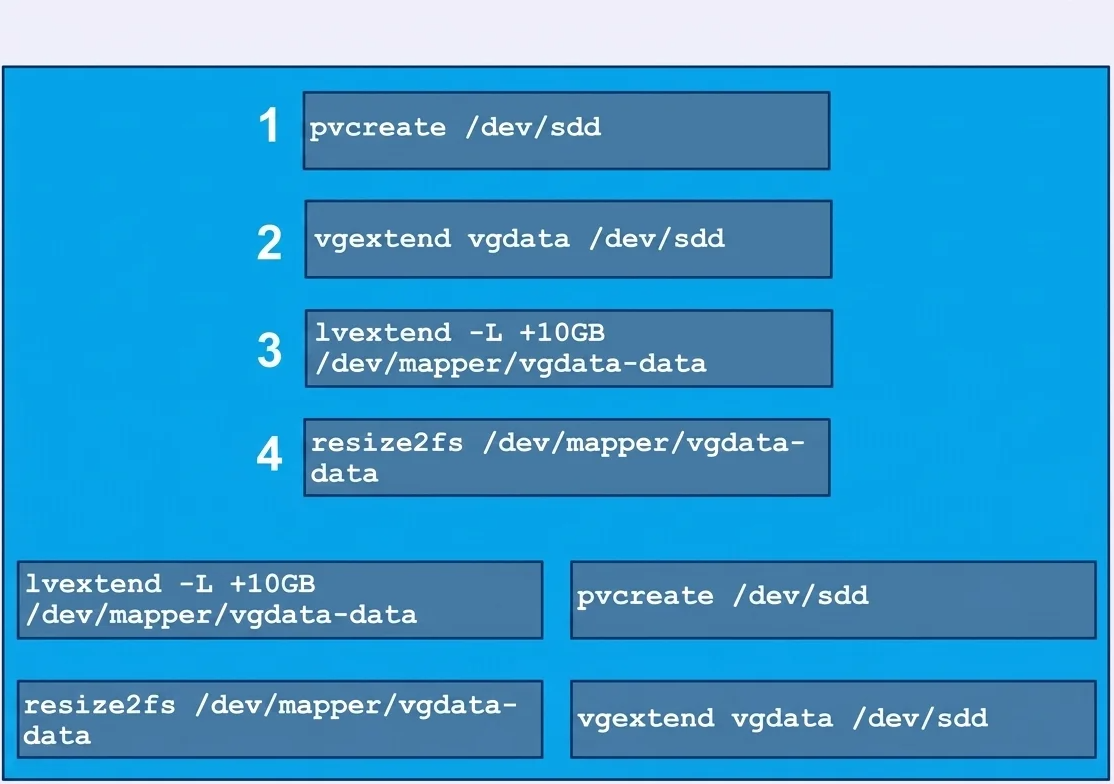
The lead Linux has added a disk, /dev/sdd, to a VM that is running out of disk space. Place the
following steps in the correct order from first (1) to last (4) to add the disk to the existing LVM.Show Answer & Explanation Hide Answer & Explanation
Correct Answer
Explanation
-
Question 2
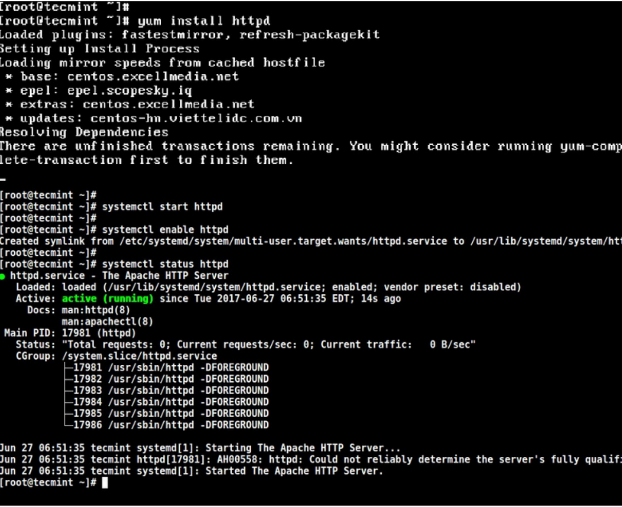
Drag & DropA junior system administrator had trouble installing and running an Apache web server on a Linux
server. You have been tasked with installing the Apache web server on the Linux server and
resolving the issue that prevented the junior administrator from running Apache.
INSTRUCTIONS
Install Apache and start the service. Verify that the Apache service is running with the defaults.
Typing “help” in the terminal will show a list of relevant commands.
If at any time you would like to bring back the initial state of the simulation, please click the Reset All
button.Show Answer & Explanation Hide Answer & Explanation
Correct Answer

Explanation
-
Question 3
Single answerWhich of the following is the BEST reason for not storing database files in the /var directory?
-
Option A:Correct
The /var filesystem is not fast enough for database files.
-
Option B:Correct
The number of files in /var is limited by the available inodes.
-
Option C:Correct
Files in /var do not have strict file permissions.
-
Option D:Correct
If log files fill up /var, it might corrupt the database.
Show Answer & Explanation Hide Answer & Explanation
Correct Answer: D
Explanation
The best answer is D. If log files fill up /var, it might corrupt the database. The
/vardirectory is used for variable data such as log files, cache files, and application data, which can grow unexpectedly over time. If log files consume all available space in the/varfilesystem, a database stored there may be unable to write new data or complete transactions properly. This can lead to database errors, service interruptions, or even data corruption. Therefore, databases are often placed on a separate filesystem or partition to protect them from space-related issues caused by other applications. -
-
Question 4
Single answerAtechnical support engineer receives a ticket from a user who is trying to create a 1KB file in the
/tmp directory and is getting the following error No space left on device. The support engineer
checks the /tmp directory, and it has 20GB of free space.
Which of the following BEST describes a possible cause for this error?-
Option A:Correct
The /tmp directory is not mounted.
-
Option B:Correct
B. The filesystem is formatted with a 4MB block size.
-
Option C:Correct
the files ystem ran out of inodes.
-
Option D:Correct
The /tmp directory has been set with an immutable attribute.
Show Answer & Explanation Hide Answer & Explanation
Correct Answer: C
Explanation
Even though the
/tmpdirectory has 20GB of free disk space, creating a new file also requires a free inode, which stores metadata about files. If all available inodes have been used, the system cannot create any additional files and will return the error "No space left on device" despite having plenty of free storage space. This situation commonly occurs when a filesystem contains a very large number of small files. Therefore, the most likely cause of the error is that the filesystem has exhausted its available inodes, making Option C the best answer. -
-
Question 5
Single answerWhich of the following would be the BEST solution for a systems administrator to access the
graphical user environment of a Linux machine remotely?-
Option A:Correct
VNC
-
Option B:Correct
KDE
-
Option C:Correct
X11
-
Option D:Correct
RPC
Show Answer & Explanation Hide Answer & Explanation
Correct Answer: A
Explanation
-