
| Exam Code | CPC-SEN |
| Exam Name | CyberArk Sentry - Privilege Cloud Exam |
| Vendor | CyberArk |
| Total Questions | 50 |
| Last Updated | 26-Oct, 2026 |
- Latest & Verified Questions
- Detailed Explanations
- Regular Updates
- Full-Length Practice Tests
- Boost Your Exam Confidence
PDF Study Materials
Downloadable guides and resources
Practice Tests
Full-length tests with real exam experience
Progress Tracking
Monitor your performance and improvement
Study Anywhere
Access on desktop, tablet, and mobile
Free CPC-SEN Practice Questions
Explore 6 free practice questions for the CyberArk CPC-SEN exam and review the answers and explanations to support your preparation.
-
Question 1
Single answerWhich browser is supported for PSM Web Connectors developed using the CyberArk Plugin Generator Utility (PGU)?
-
Option A:Correct
Internet Explorer
-
Option B:Correct
Google Chrome
-
Option C:Correct
Opera
-
Option D:Correct
Show Answer & Explanation Hide Answer & Explanation
Correct Answer: B
Explanation
For PSM Web Connectors developed using the CyberArk Plugin Generator Utility (PGU), the supported browser is Google Chrome. This is because the PGU is designed to create plugins that are most compatible with Chrome ' s web technologies and security frameworks. Chrome is generally recommended by CyberArk for its up-to-date security features and extensive support for web applications. This is further supported by the CyberArk documentation on the Plugin Generator Utility, which specifies browser compatibility and the optimal environment for deploying web connectors.
-
-
Question 2
Single answerAfter correctly configuring reconciliation parameters in the Prod-AIX-Root-Accounts Platform, this error message appears in the CPM log: CACPM410E Ending password policy Prod-AIX-Root-Accounts since the reconciliation task is active but the AllowedSafes parameter was not updated What caused this situation?
-
Option A:Correct
The reconciliation account defined in the Platform is in a locked state and is not accessible.
-
Option B:Correct
The CPM is currently configured to use to an unsigned engine.
-
Option C:Correct
The AllowedSafes parameter does not include the safe containing the reconciliation account defined in the Platform.
-
Option D:Correct
A second CPM is incorrectly configured to manage the reconciliation account ' s safe which is causing a deadlock situation between the two CPMs.
Show Answer & Explanation Hide Answer & Explanation
Correct Answer: C
Explanation
The error message " CACPM410E Ending password policy Prod-AIX-Root-Accounts since the reconciliation task is active but the AllowedSafes parameter was not updated " suggests an issue with configuration parameters. The likely cause is:
The AllowedSafes parameter does not include the safe containing the reconciliation account defined in the Platform (Option C). This parameter must accurately reflect all safes where the reconciliation account operates to ensure proper management and access by the Central Policy Manager (CPM). If the safe containing the reconciliation account is not listed, the CPM cannot perform its tasks, leading to this error.
[Reference: CyberArk’s error codes and troubleshooting guides detail how specific configuration mismatches, like an incomplete AllowedSafes parameter, can disrupt normal operations, especially in reconciliation processes., , ] -
-
Question 3
Multiple answersWhat are dependencies to update or change the CPM credential? (Choose 2.)
-
Option A:Correct
APIKeyManager.exe
-
Option B:Correct
CreateCredFile.exe
-
Option C:Correct
CPM/nDomain_Hardening.ps1
-
Option D:Correct
CyberArk.TPC.exe
-
Option E:Correct
Show Answer & Explanation Hide Answer & Explanation
Correct Answer: B, D
Explanation
To update or change the Central Policy Manager (CPM) credentials, dependencies include:
CreateCredFile.exe (B): This utility is used to create or modify the encrypted file that stores the CPM ' s credentials. It is essential for securely handling the credential updates.
CyberArk.TPC.exe (D): This executable is part of the CyberArk suite that manages trusted platform module operations, which can include tasks related to credential security and management, particularly when hardware security modules are involved.
-
-
Question 4
Single answerHow can a platform be configured to work with load-balanced PSMs?
-
Option A:Correct
Remove all entries from configured PSM Servers except for the ID of the PSMs with load balancing.
-
Option B:Correct
Create a new PSM definition that targets the load balancer IP address and assign to the platform.
-
Option C:Correct
Include details of the PSMs with load balancing in the Basic_psm.ini file on each PSM server.
-
Option D:Correct
Show Answer & Explanation Hide Answer & Explanation
Correct Answer: B
Explanation
To configure a platform to work with load-balanced Privileged Session Managers (PSMs), you should:
Create a new PSM definition that targets the load balancer IP address and assign it to the platform (Option B). This approach involves configuring the platform settings to direct session traffic through a load balancer that distributes the load across multiple PSM servers. This is effective in environments where high availability and fault tolerance are priorities.
[Reference: CyberArk’s setup guidelines for high-availability environments typically recommend configuring platforms to utilize load balancers to ensure continuous availability and optimal distribution of session management tasks., , ] -
-
Question 5
Single answerAfter a scripted installation has successfully installed the PSM, which post-installation task is performed?
-
Option A:Correct
The screen saver for the PSM local users is disabled.
-
Option B:Correct
A new group called PSMShadowUsers is created.
-
Option C:Correct
The PSMAdminConnect user password is reset.
-
Option D:Correct
Remote desktop services are installed.
Show Answer & Explanation Hide Answer & Explanation
Correct Answer: A
Explanation
After the successful scripted installation of the Privileged Session Manager (PSM), one of the post-installation tasks is to disable the screen saver for the PSM local users. This is done to ensure that the PSMConnect and PSMAdminConnect users, which are created during the installation process, do not have a screen saver activated that could interfere with the operation of the PSM.
Reference:
CyberArk documentation on PSM post-installation tasks1.
CyberArk documentation on disabling the screen saver for PSM local users
-
-
Question 6
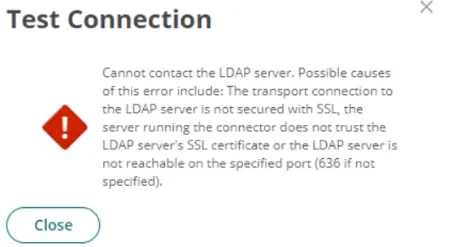
Multiple answersRefer to the exhibit.
You set up your LDAP Directory in CyberArk Identity, but encountered an error during the connection test.
Which scenarios could represent a valid misconfiguration? (Choose 2.)
-
Option A:Correct
TCP Port 636 could be blocked by a network firewall, preventing communication between the CyberArk Identity Connector and the LDAP Server.
-
Option B:Correct
All required CA Certificates have been installed on the CyberArk Identity Connector but the LDAP Bind credentials provided are incorrect.
-
Option C:Correct
Verify Server Certificate' is activated but the provided hostname is not listed as a Subject Alternative Name (SAN) in the LDAP server's certificate.
-
Option D:Correct
TCP Port 636 could be blocked by a network firewall, preventing communication between the Secure Tunnel and the LDAP Server.
Show Answer & Explanation Hide Answer & Explanation
Correct Answer: A, C
Explanation
From the error message provided, two likely scenarios could represent valid misconfigurations:
TCP Port 636 could be blocked by a network firewall, preventing communication between the CyberArk Identity Connector and the LDAP Server (A).
This is a common issue where firewall settings prevent the secure communication port (typically 636 for LDAPS) from transmitting data between
the server and the connector, thus blocking the connection attempt.
'Verify Server Certificate' is activated but the provided hostname is not listed as a Subject Alternative Name (SAN) in the LDAP server's certificate (C).
This scenario occurs when SSL/TLS security measures are stringent, requiring that the hostname used to connect to the LDAP server must match one listed in the server's SSL certificate.
If the hostname does not match, the connection will fail due to SSL certificate validation errors.
-