
| Exam Code | Associate-Cloud-Engineer |
| Exam Name | Google Associate Cloud Engineer Exam |
| Vendor | |
| Total Questions | 332 |
| Last Updated | 26-Oct, 2026 |
- Latest & Verified Questions
- Detailed Explanations
- Regular Updates
- Full-Length Practice Tests
- Boost Your Exam Confidence
PDF Study Materials
Downloadable guides and resources
Practice Tests
Full-length tests with real exam experience
Progress Tracking
Monitor your performance and improvement
Study Anywhere
Access on desktop, tablet, and mobile
Free Associate-Cloud-Engineer Practice Questions
Explore 5 free practice questions for the Google Associate-Cloud-Engineer exam and review the answers and explanations to support your preparation.
-
Question 1
Single answerYouare configuring Cloud DNS. You want !to create DNS records to pointhome.mydomain.com,mydomain.com. andwww.mydomain.comto the IP address of your Google Cloud load balancer. What should you do?
-
Option A:Correct
Create one CNAME record to point mydomain.com to the load balancer, and create two A records to point WWW and HOME lo mydomain.com respectively.
-
Option B:Correct
Create one CNAME record to point mydomain.com to the load balancer, and create two AAAA records to point WWW and HOME to mydomain.com respectively.
-
Option C:Correct
Create one A record to point mydomain.com to the load balancer, and create two CNAME records to point WWW and HOME to mydomain.com respectively.
-
Option D:Correct
Create one A record to point mydomain.com lo the load balancer, and create two NS records to point WWW and HOME to mydomain.com respectively.
Show Answer & Explanation Hide Answer & Explanation
Correct Answer: C
-
-
Question 2
Single answerYou want to deploy a new containerized application into Google Cloud by using a Kubernetes manifest. You want to have full control over the Kubernetes deployment, and at the same time, you want to minimize configuring infrastructure. What should you do?
-
Option A:Correct
Deploy the application on GKE Autopilot.
-
Option B:Correct
Deploy the application on GKE Standard.
-
Option C:Correct
Deploy the application on Cloud Functions.
-
Option D:Correct
Show Answer & Explanation Hide Answer & Explanation
Correct Answer: B
-
-
Question 3
Single answerYou want to select and configure a cost-effective solution for relational data on Google Cloud Platform. You are working with a small set of operational data in one geographic location. You need to support point-in-time recovery. What should you do?
-
Option A:Correct
Select Cloud SQL (MySQL). Verify that the enable binary logging option is selected.
-
Option B:Correct
Select Cloud SQL (MySQL). Select the create failover replicas option.
-
Option C:Correct
Select Cloud Spanner. Set up your instance with 2 nodes.
-
Option D:Correct
Show Answer & Explanation Hide Answer & Explanation
Correct Answer: A
Explanation
[Reference: https://cloud.google.com/sql/docs/mysql/backup-recovery/restore, , https://cloud.google.com/sql/docs/mysql/backup-recovery/pitr#disk-usage, , ]
-
-
Question 4
Single answerYou are building a pipeline to process time-series data. Which Google Cloud Platform services should you put in boxes 1,2,3, and 4?
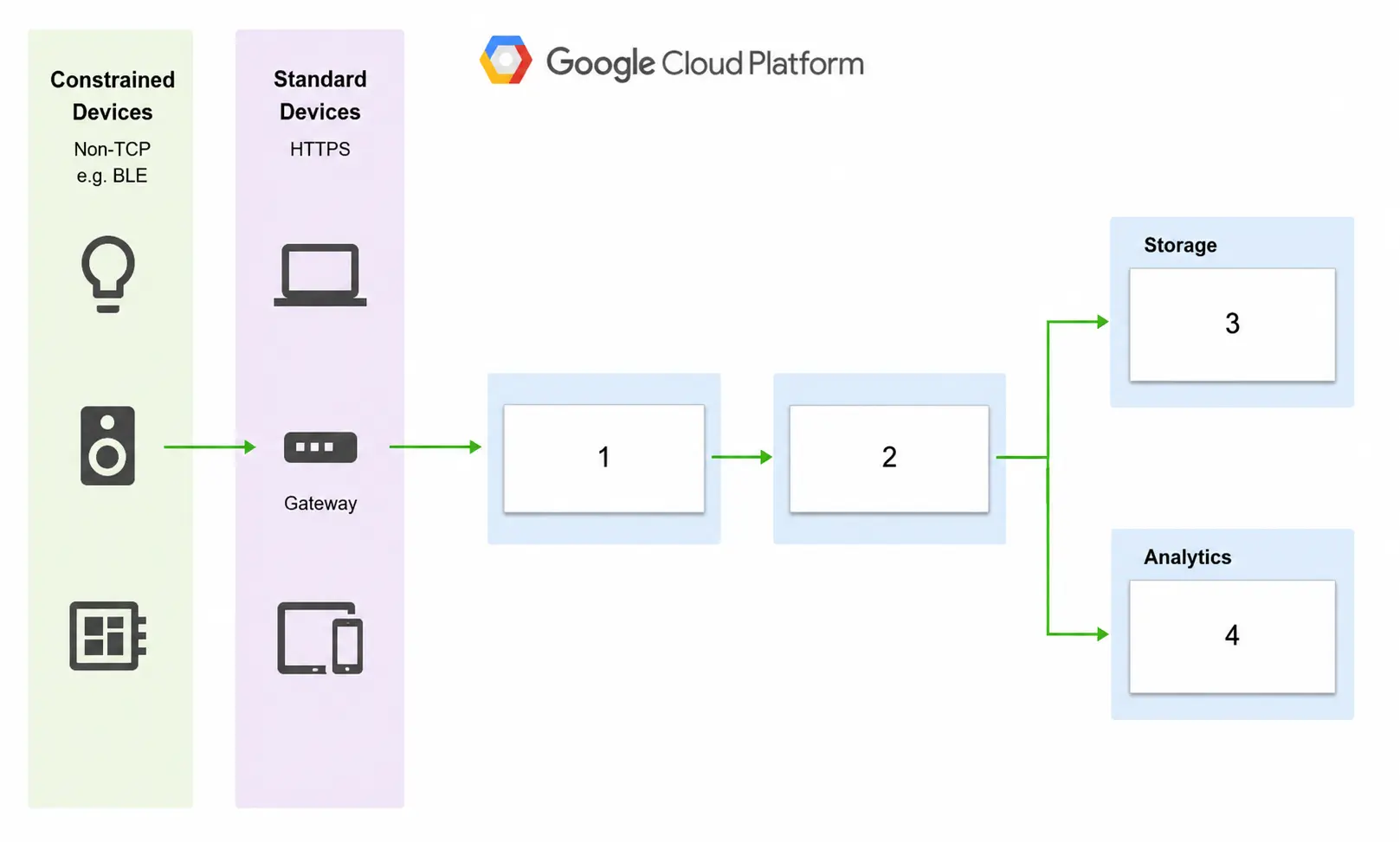
-
Option A:Correct
Cloud Pub/Sub, Cloud Dataflow, Cloud Datastore, BigQuery
-
Option B:Correct
Firebase Messages, Cloud Pub/Sub, Cloud Spanner, BigQuery
-
Option C:Correct
Cloud Pub/Sub, Cloud Storage, BigQuery, Cloud Bigtable
-
Option D:Correct
Show Answer & Explanation Hide Answer & Explanation
Correct Answer: D
Explanation
[Reference: https://cloud.google.com/solutions/correlating-time-series-dataflow, , https://cloud.google.com/blog/products/data-analytics/handling-duplicate-data-in-streaming-pipeline-using-pubsub-dataflow, https://cloud.google.com/bigtable/docs/schema-design-time-series, , ]
-
-
Question 5
Single answerYou are performing a monthly security check of your Google Cloud environment and want to know who has access to view data stored in your Google Cloud
Project. What should you do?
-
Option A:Correct
Enable Audit Logs for all APIs that are related to data storage.
-
Option B:Correct
Review the IAM permissions for any role that allows for data access.
-
Option C:Correct
Review the Identity-Aware Proxy settings for each resource.
-
Option D:Correct
Show Answer & Explanation Hide Answer & Explanation
Correct Answer: B
Explanation
https://cloud.google.com/logging/docs/audit -