
Exam Overview
| Exam Code | AB-900 |
| Exam Name | Microsoft 365 Copilot and Agent Administration Fundamentals (beta) |
| Vendor | Microsoft |
| Total Questions | 75 |
| Last Updated | 26-Oct, 2026 |
Why CertsPoint?
- Latest & Verified Questions
- Detailed Explanations
- Regular Updates
- Full-Length Practice Tests
- Boost Your Exam Confidence
PDF Study Materials
Downloadable guides and resources
Practice Tests
Full-length tests with real exam experience
Progress Tracking
Monitor your performance and improvement
Study Anywhere
Access on desktop, tablet, and mobile
Secure Payment
Privacy Protected
Money Back Guarantee
Free AB-900 Practice Questions
Explore 3 free practice questions for the Microsoft AB-900 exam and review the answers and explanations to support your preparation.
-
Question 1
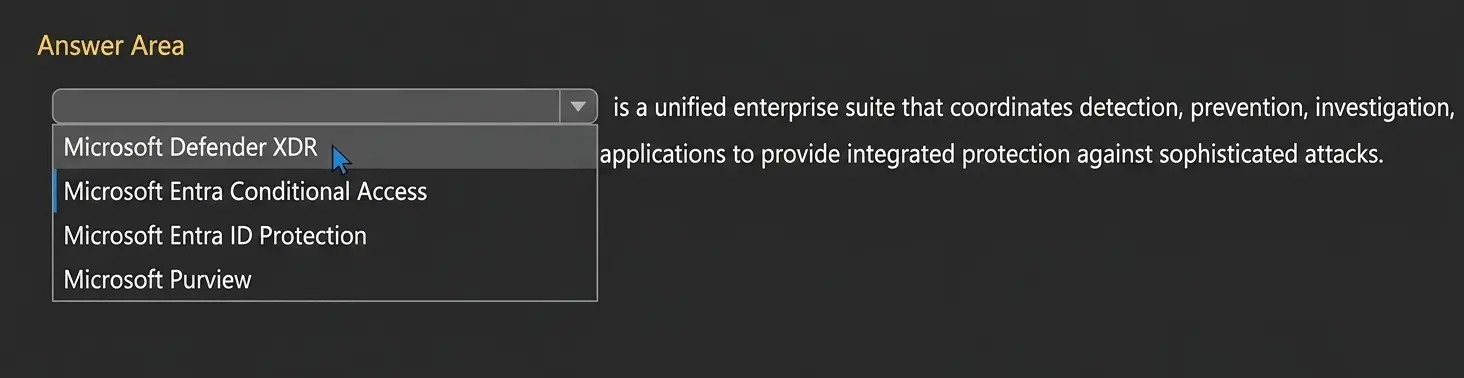
Drag & DropHOTSPOT Select the answer that correctly completes the sentence.
Show Answer & Explanation Hide Answer & Explanation
Correct Answer

Explanation
The correct answer is Microsoft Defender XDR. Microsoft Learn defines Microsoft Defender XDR as a unified pre- and post-breach enterprise defense suite that natively coordinates detection, prevention, investigation, and response across endpoints, identities, email, and applications to provide integrated protection against sophisticated attacks. That wording matches the sentence in the question almost exactly, which makes this the clearly correct choice. The other options do not fit that definition. Microsoft Entra Conditional Access is Microsoft’s Zero Trust policy engine used to evaluate signals and enforce access policies, not a cross-domain threat detection and response suite. Microsoft Entra ID Protection focuses on detecting and responding to identity risks such as risky sign-ins and risky users. Microsoft Purview is Microsoft’s portfolio for data governance, data security, and compliance. None of those products is described by Microsoft as coordinating detection, prevention, investigation, and response across endpoints, identities, email, and applications in the same integrated XDR manner. Therefore, the only answer that correctly completes the sentence is Microsoft Defender XDR.
-
Question 2
Multiple answersYour organization has a Microsoft 365 subscription. Which two tasks can you perform by using the Exchange admin center? Each correct answer presents part of the solution. NOTE: Each correct selection is worth one point.
-
Option A:Correct
Create a mail flow rule.
-
Option B:Correct
Add a custom domain.
-
Option C:Correct
Assign a Microsoft Exchange license.
-
Option D:Correct
Create a shared mailbox.
Show Answer & Explanation Hide Answer & Explanation
Correct Answer: A, D
Explanation
The correct answers are A and D because both tasks are supported directly in the Exchange admin center (EAC). Microsoft Learn states that administrators can manage mail flow rules in Exchange Online from the EAC under Mail flow > Rules, which includes creating and managing transport rules for organizational email handling. Microsoft Learn also states that administrators can create shared mailboxes in the EAC under Recipients > Mailboxes, where a shared mailbox can be added and then delegated to users. Option B is incorrect because adding a custom domain is normally done in the Microsoft 365 admin center, specifically on the Domains page. Although Exchange can later work with accepted domains and related mail flow settings, the act of adding and verifying a custom domain is not an Exchange admin center task. Option C is incorrect because license assignment is handled through Microsoft 365 or Microsoft Entra administrative tools, not the Exchange admin center
-
-
Question 3
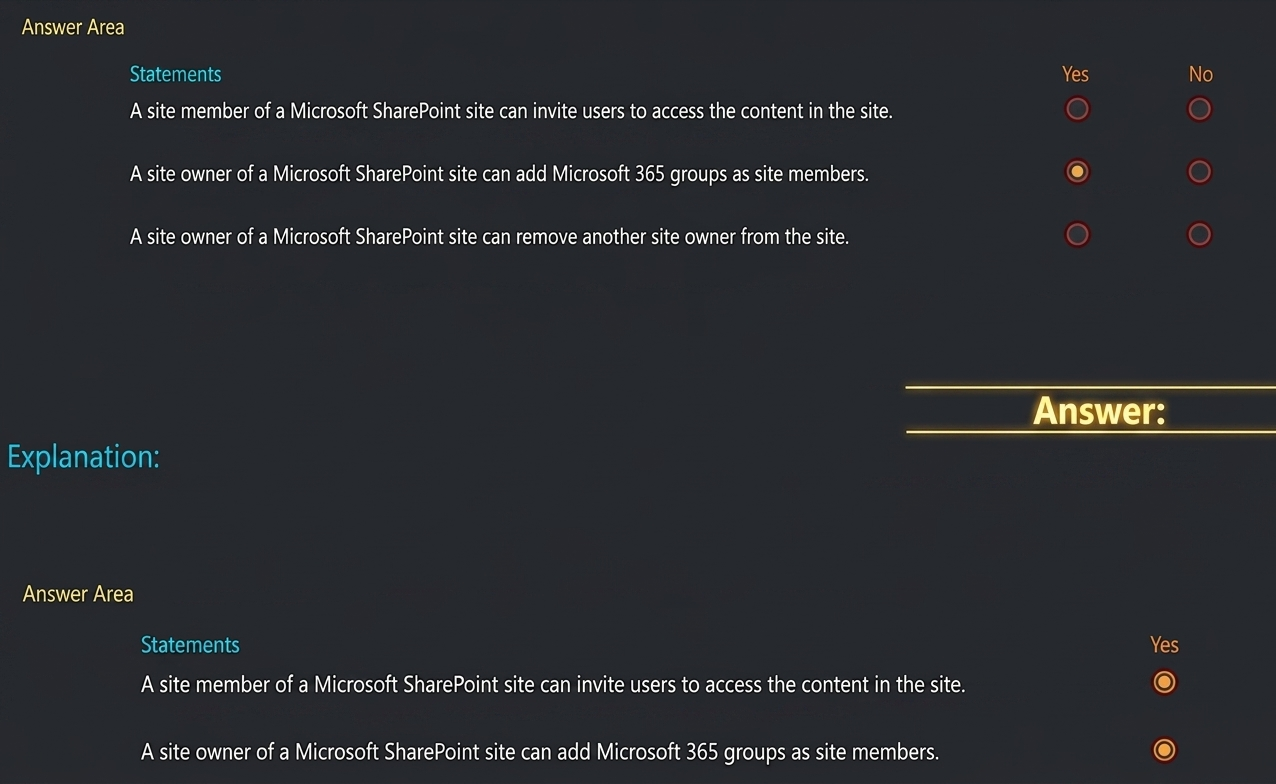
Drag & DropHOTSPOT
Chose the answerShow Answer & Explanation Hide Answer & Explanation
Correct Answer
Explanation
The correct selections are Yes, Yes, Yes. For statement 1, Microsoft Support explains that if you are not a site owner, you might still be able to invite other people to the site, although the invitation can generate an access request that a site owner approves or declines. Microsoft also states that site users have the opportunity to invite other people to collaborate on sites, unless that feature is disabled. That makes the statement true. For statement 2, Microsoft Learn states that in SharePoint you can give people permissions to a site by adding individual users, security groups, or Microsoft 365 groups to one of the three SharePoint groups, including the Members group. That directly supports the statement. For statement 3, Microsoft documents that site ownership and membership can be managed by adding or removing owners, members, site owners, site members, and site visitors. For group- connected sites, Microsoft also documents that owners can manage group ownership and remove owner status. Therefore, a site owner can remove another site owner, provided at least one owner remains.