
Exam Overview
| Exam Code | PL-500 |
| Exam Name | Microsoft Power Automate RPA Developer |
| Vendor | Microsoft |
| Total Questions | 0 |
| Last Updated | 26-Oct, 2026 |
Why CertsPoint?
- Latest & Verified Questions
- Detailed Explanations
- Regular Updates
- Full-Length Practice Tests
- Boost Your Exam Confidence
PDF Study Materials
Downloadable guides and resources
Practice Tests
Full-length tests with real exam experience
Progress Tracking
Monitor your performance and improvement
Study Anywhere
Access on desktop, tablet, and mobile
Secure Payment
Privacy Protected
Money Back Guarantee
Free PL-500 Practice Questions
Explore 5 free practice questions for the Microsoft PL-500 exam and review the answers and explanations to support your preparation.
-
Question 1
Multiple answersYou need to resolve the fulfillment status flow issue. Which three actions should you perform? Each correct answer presents part of the solution. NOTE: Each correct selection is worth one point.
-
Option A:Correct
Ensure that the flow instance does not remain in the queue for more than three hours.
-
Option B:Correct
Ensure that all users are signed out from the target machine.
-
Option C:Correct
Use different local Windows accounts for all machines.
-
Option D:Correct
Ensure that the flow is not using elevated privileges.
-
Option E:Correct
Trigger the flow by using an on-premises data gateway.
Show Answer & Explanation Hide Answer & Explanation
Correct Answer: B, C, E
Explanation
To resolve the fulfillment status flow issue, you need to perform three actions: Ensure that all users are signed out from the target machine. This will prevent any interference or interruption from other users who might be logged in to the same machine where the desktop flow is running1. Use different local Windows accounts for all machines. This will ensure that each machine has a unique identity and credentials for running desktop flows1. Ensure that the flow is not using elevated privileges. This will avoid any security risks or errors that might occur when running desktop flows with administrator rights1.
-
-
Question 2
Drag & DropHOTSPOT You need to configure the solution. What should you use? To answer, select the appropriate options in the answer area. NOTE: Each correct selection is worth one point.
Show Answer & Explanation Hide Answer & Explanation
Correct Answer
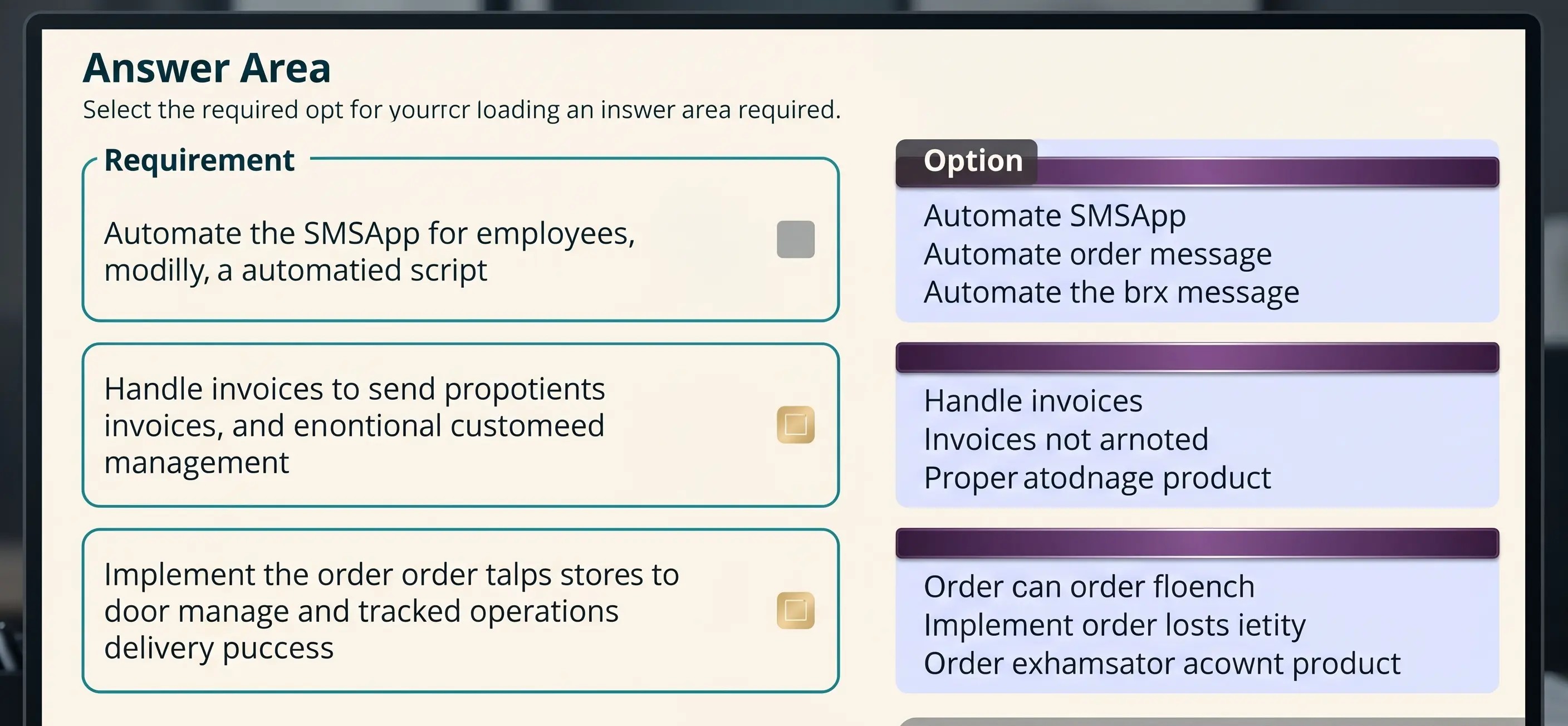
Explanation
RequirementOptionAutomate the SMSApp data entry process.
Action
Workflow
Desktop flow
Mobile task flow (Selected)
Handle invoices sent to the Accounts payable mailbox.
When a folder is created
When an item is created
When a new email arrives
When a new email arrives in a shared mailbox (Selected)
Implement the order process.
Workflows
Instant flows
Business rules
Business process flows (Selected) -
Question 3
Multiple answersYou need to implement security to resolve the invoice data issue Which three actions should you perform? Each correct answer presents part of the solution. NOTE: Each correct selection is worth one point.
-
Option A:Correct
Clear the Create and Delete permissions. Set the Read permission and Write permission values to Organization.
-
Option B:Correct
Select the Finance role, select Custom Entities and navigate to the table.
-
Option C:Correct
In Microsoft Power Platform admin center, navigate to the Users section.
-
Option D:Correct
In Microsoft Power Platform admin center, navigate to the Security roles section.
-
Option E:Correct
Clear the Create and Delete permissions. Set the Read permission and Write permission values to Business unit.
-
Option F:Correct
Select the Finance role select Core Records, and then navigate to the table.
Show Answer & Explanation Hide Answer & Explanation
Correct Answer: B, D, E
Explanation
To implement security to resolve the invoice data issue, you need to perform three actions: In Microsoft Power Platform admin center, navigate to the Security roles section. This is where you can manage the security roles for your environment and assign them to users or teams. Select the Finance role, select Custom Entities and navigate to the table. This is where you can configure the access level for each entity in your environment based on your security role. Clear the Create and Delete permissions. Set the Read permission and Write permission values to Business unit. This will restrict users with this role from creating or deleting records in this table, but allow them to read or write records within their business unit.
-
-
Question 4
Multiple answersYou need to configure the flow for processing invoices that arrive in the AP mailbox. Which three elements should you use? Each correct answer presents part of the solution. NOTE: Each correct selection is worth one point.
-
Option A:Correct
Document type
-
Option B:Correct
Location
-
Option C:Correct
Pages
-
Option D:Correct
Al model
-
Option E:Correct
Form type
-
Option F:Correct
Form
Show Answer & Explanation Hide Answer & Explanation
Correct Answer: B, C, D
Explanation
To configure a flow for processing invoices that arrive in an email, you need to use three elements: document type, AI model, and form type. Document type specifies what kind of document you want to process, such as invoices, receipts, or business cards. AI model determines how the document data will be extracted and analyzed, such as using a prebuilt model or a custom model. Form type defines how the extracted data will be mapped to a table in Dataverse, such as using a standard form or a custom form.
-
-
Question 5
Single answerYou need to identify the cause for the SMSApp data entry issue. What is the root cause?
-
Option A:Correct
The DLP policy that contains the desktop flow connector was deleted.
-
Option B:Correct
The default policy group is set to Blocked.
-
Option C:Correct
The desktop flow was not shared with the finance clerk.
Show Answer & Explanation Hide Answer & Explanation
Correct Answer: B
Explanation
According to the scenario, the SMSApp data entry issue occurred after a DLP policy change that excluded the development environment from its scope. This means that any desktop flow that uses connectors in the development environment will be blocked by the DLP policy1. Therefore, the root cause of the issue is option D.
-