| Exam Code | EX294 |
| Exam Name | Red Hat Certified Engineer (RHCE) exam for Red Hat Enterprise Linux 8 Exam |
| Vendor | RedHat |
| Total Questions | 35 |
| Last Updated | 26-Oct, 2026 |
- Latest & Verified Questions
- Detailed Explanations
- Regular Updates
- Full-Length Practice Tests
- Boost Your Exam Confidence
PDF Study Materials
Downloadable guides and resources
Practice Tests
Full-length tests with real exam experience
Progress Tracking
Monitor your performance and improvement
Study Anywhere
Access on desktop, tablet, and mobile
Free EX294 Practice Questions
Explore 10 free practice questions for the RedHat EX294 exam and review the answers and explanations to support your preparation.
-
Question 1
Drag & DropCreate a playbook /home/bob /ansible/motd.yml that runs on all inventory hosts and docs the following: The playbook should replaee any existing content of/etc/motd in the following text. Use ansible facts to display the FQDN of each host
On hosts in the dev host group the line should be " Welcome to Dev Server FQDN " .
On hosts in the webserver host group the line should be " Welcome to Apache Server FQDN " .
On hosts in the database host group the line should be " Welcome to MySQL Server FQDN " .
Show Answer & Explanation Hide Answer & Explanation
Correct Answer
See the Explanation for complete Solution below.
Explanation
/home/sandy/ansible/roles/sample-apache/tasks/main.yml -
Question 2
Drag & DropInstall the RHEL system roles package and create a playbook called timesync.yml that:
-- > Runs over all managed hosts.
-- > Uses the timesync role.
-- > Configures the role to use the time server 192.168.10.254 ( Hear in redhat lab
use " classroom.example.com " )
-- > Configures the role to set the iburst parameter as enabled.
Show Answer & Explanation Hide Answer & Explanation
Correct Answer
See the Explanation for complete Solution below.
Explanation
Solution as:
# pwd
home/admin/ansible/
# sudo yum install rhel-system-roles.noarch -y
# cd roles/
# ansible-galaxy list
# cp -r /usr/share/ansible/roles/rhelsystem-roles.timesync .
# vim timesync.yml
---
- name: timesynchronization
hosts: all
vars:
timesync_ntp_provider: chrony
timesync_ntp_servers:
- hostname: classroom.example.com _ in exam its ip-address
iburst: yes
timezone: Asia/Kolkata
roles:
- rhel-system-roles.timesync
tasks:
- name: set timezone
timezone:
name: " {{ timezone }} "
wq!
timedatectl list-timezones | grep india
# ansible-playbook timesync.yml --syntax-check
# ansible-playbook timesync.yml
# ansible all -m shell -a ' chronyc sources -v '
# ansible all -m shell -a ' timedatectl '
# ansible all -m shell -a ' systemctl is-enabled chronyd '
-
Question 3
Drag & DropModify file content.
------------------------
Create a playbook called /home/admin/ansible/modify.yml as follows:
* The playbook runs on all inventory hosts
* The playbook replaces the contents of /etc/issue with a single line of text as
follows:
-- > On hosts in the dev host group, the line reads: “Development”
-- > On hosts in the test host group, the line reads: “Test”
-- > On hosts in the prod host group, the line reads: “Production”
Show Answer & Explanation Hide Answer & Explanation
Correct Answer
See the Explanation for complete Solution below.
Explanation
Solution as:
# pwd
/home/admin/ansible
# vim modify.yml
---
- name:
hosts: all
tasks:
- name:
copy:
content: " Development "
dest: /etc/issue
when: inventory_hostname in groups[ ' dev ' ]
- name:
copy:
content: " Test "
dest: /etc/issue
when: inventory_hostname in groups[ ' test ' ]
- name:
copy:
content: " Production "
dest: /etc/issue
when: inventory_hostname in groups[ ' prod ' ]
wq
# ansible-playbook modify.yml –-syntax-check
# ansible-playbook modify.yml
-
Question 4
Drag & DropCreate an Ansible vault to store user passwords as follows:
* The name of the vault is valut.yml
* The vault contains two variables as follows:
- dev_pass with value wakennym
- mgr_pass with value rocky
* The password to encrypt and decrypt the vault is atenorth
* The password is stored in the file /home/admin/ansible/password.txt
Show Answer & Explanation Hide Answer & Explanation
Correct Answer
See the Explanation for complete Solution below.
Explanation
Solution as:
# pwd
/home/admin/ansible
# echo " atenorth " > password.txt
# chmod 0600 password.txt
# ansible-vault create vault.yml --vault-password-file=password.txt
---
- dev_pass: wakennym
- mgr_pass: rocky
wq
# cat vault.yml
$ANSIBLE_VAULT;1.1;AES256
36383862376164316436353665343765643331393433373564613762666531313034336438353662
3464346331346461306337633632393563643531376139610a343531326130663266613533633562
38623439316631306463623761343939373263333134353264333834353264343934373765643737
3535303630626666370a643663366634383863393338616661666632353139306436316430616334
65386134393363643133363738656130636532346431376265613066326162643437643064313863
6633333537303334333437646163343666666132316639376531
# ansible-vault view vault.yml
password:******
---
- dev_pass: wakennym
- mgr_pass: rocky
-
Question 5
Drag & DropGenerate a hosts file:
* Download an initial template file hosts.j2 from http://classroom.example.com/
hosts.j2 to
/home/admin/ansible/ Complete the template so that it can be used to generate a file
with a
line for each inventory host in the same format as /etc/hosts:
172.25.250.9 workstation.lab.example.com workstation
* Create a playbook called gen_hosts.yml that uses this template to generate the file
/etc/myhosts on hosts in the dev host group.
* When completed, the file /etc/myhosts on hosts in the dev host group should have a
line for
each managed host:
127.0.0.1 localhost localhost.localdomain localhost4 localhost4.localdomain4
::1 localhost localhost.localdomain localhost6 localhost6.localdomain6
172.25.250.10 serevra.lab.example.com servera
172.25.250.11 serevrb.lab.example.com serverb
172.25.250.12 serevrc.lab.example.com serverc
172.25.250.13 serevrd.lab.example.com serverd
-----------------------------------------------------------------
while practising you to create these file hear. But in exam have to download as per
questation.
hosts.j2 file consists.
localhost localhost.localdomain localhost4 localhost4.localdomain4
::1
localhost localhost.localdomain localhost6 localhost6.localdomain6
-------------------------------------------------------------------
Show Answer & Explanation Hide Answer & Explanation
Correct Answer
See the Explanation for complete Solution below.
Explanation
Solution as:
# pwd
/home/admin/ansible
# wget http://classroom.example.com/hosts.j2
# vim hosts.j2
127.0.0.1 localhost localhost.localdomain localhost4 localhost4.localdomain4 ::1
localhost localhost.localdomain localhost6 localhost6.localdomain6
{% for host in groups[ ' all ' ] %}
{{ hostvars[host][ ' ansible_facts ' ][ ' default_ipv4 ' ][ ' address ' ] }} {{ hostvars[host]
[ ' ansible_facts ' ][ ' fqdn ' ] }} {{ hostvars[host] [ ' ansible_facts ' ][ ' hostname ' ] }}
{% endfor %}
wq!
# vim gen_hosts.yml
---
- name: collecting all host information
hosts: all
tasks:
- name:
template:
src: hosts.j2
dest: /etc/myhosts
when: inventory_hostname in groups[ ' dev ' ]
wq
# ansible-playbook gen_hosts.yml -–syntax-check
# ansible-playbook gen_hosts.yml
-
Question 6
Drag & DropModify file content.
------------------------
Create a playbook called /home/admin/ansible/modify.yml as follows:
* The playbook runs on all inventory hosts
* The playbook replaces the contents of /etc/issue with a single line of text as
follows:
-- > On hosts in the dev host group, the line reads: “Development”
-- > On hosts in the test host group, the line reads: “Test”
-- > On hosts in the prod host group, the line reads: “Production”
Show Answer & Explanation Hide Answer & Explanation
Correct Answer
See the explanation for complete solution below:Explanation
Solution as:
# pwd
/home/admin/ansible
# vim modify.yml
---
- name:
hosts: all
tasks:
- name:
copy:
content: " Development "
dest: /etc/issue
when: inventory_hostname in groups[ ' dev ' ]
- name:
copy:
content: " Test "
dest: /etc/issue
when: inventory_hostname in groups[ ' test ' ]
- name:
copy:
content: " Production "
dest: /etc/issue
when: inventory_hostname in groups[ ' prod ' ]
wq
# ansible-playbook modify.yml –-syntax-check
# ansible-playbook modify.yml
-
Question 7
Drag & DropCreate a role called apache in " /home/admin/ansible/roles " with the following
requirements:
-- > The httpd package is installed, enabled on boot, and started.
-- > The firewall is enabled and running with a rule to allow access to the web server.
-- > template file index.html.j2 is used to create the file /var/www/html/index.html
with the output:
Welcome to HOSTNAME on IPADDRESS
-- > Where HOSTNAME is the fqdn of the managed node and IPADDRESS is the IP-Address of
the managed node.
note: you have to create index.html.j2 file.
-- > Create a playbook called httpd.yml that uses this role and the playbook runs on
hosts in the webservers host group.
Show Answer & Explanation Hide Answer & Explanation
Correct Answer
See the explanation for complete solution below:
Explanation
Solution as:
----------
# pwd
/home/admin/ansible/roles/
# ansible-galaxy init apache
# vim apache/vars/main.yml
---
# vars file for apache
http_pkg: httpd
firewall_pkg: firewalld
http_srv: httpd
firewall_srv: firewalld
rule: http
webpage: /var/www/html/index.html
template: index.html.j2
wq!
# vim apache/tasks/package.yml
---
- name: Installing packages
yum:
name:
- " {{http_pkg}} "
- " {{firewall_pkg}} "
state: latest
wq!
# vim apache/tasks/service.yml
---
- name: start and enable http service
service:
name: " {{http_srv}} "
enabled: true
state: started
- name: start and enable firewall service
service:
name: " {{firewall_srv}} "
enabled: true
state: started
wq!
# vim apache/tasks/firewall.yml
---
- name: Adding http service to firewall
firewalld:
service: " {{rule}} "
state: enabled
permanent: true
immediate: true
wq!
# vim apache/tasks/webpage.yml
---
- name: creating template file
template:
src: " {{template}} "
dest: " {{webpage}} "
notify: restart_httpd
!wq
# vim apache/tasks/main.yml
# tasks file for apache
- import_tasks: package.yml
- import_tasks: service.yml
- import_tasks: firewall.yml
- import_tasks: webpage.yml
wq!
# vim apache/templates/index.html.j2
Welcome to {{ ansible_facts.fqdn }} on {{ ansible_facts.default_ipv4.address }}
# vim apache/handlers/main.yml
---
# handlers file for apache
- name: restart_httpd
service:
name: httpd
state: restarted
wq!
# cd ..
# pwd
/home/admin/ansible/
# vim httpd.yml
---
- name: Including apache role
hosts: webservers
pre_tasks:
- name: pretask message
debug:
msg: ' Ensure webserver configuration '
roles:
- ./roles/apache
post_tasks:
- name: Check webserver
uri:
url: " http://{{ ansible_facts.default_ipv4.address }} "
return_content: yes
status_code: 200
wq!
# ansible-playbook httpd.yml –-syntax-check
# ansible-playbook httpd.yml
# curl http://serverx
-
Question 8
Drag & DropCreate an Ansible vault to store user passwords as follows:
* The name of the vault is valut.yml
* The vault contains two variables as follows:
- dev_pass with value wakennym
- mgr_pass with value rocky
* The password to encrypt and decrypt the vault is atenorth
* The password is stored in the file /home/admin/ansible/password.txt
Show Answer & Explanation Hide Answer & Explanation
Correct Answer
See the explanation for complete solution below:
Explanation
Solution as:
# pwd
/home/admin/ansible
# echo " atenorth " > password.txt
# chmod 0600 password.txt
# ansible-vault create vault.yml --vault-password-file=password.txt
---
- dev_pass: wakennym
- mgr_pass: rocky
wq
# cat vault.yml
$ANSIBLE_VAULT;1.1;AES256
36383862376164316436353665343765643331393433373564613762666531313034336438353662
3464346331346461306337633632393563643531376139610a343531326130663266613533633562
38623439316631306463623761343939373263333134353264333834353264343934373765643737
3535303630626666370a643663366634383863393338616661666632353139306436316430616334
65386134393363643133363738656130636532346431376265613066326162643437643064313863
6633333537303334333437646163343666666132316639376531
# ansible-vault view vault.yml
password:******
---
- dev_pass: wakennym
- mgr_pass: rocky
-
Question 9
Drag & DropGenerate a hosts file:
* Download an initial template file hosts.j2 from http://classroom.example.com/
hosts.j2 to
/home/admin/ansible/ Complete the template so that it can be used to generate a file
with a
line for each inventory host in the same format as /etc/hosts:
172.25.250.9 workstation.lab.example.com workstation
* Create a playbook called gen_hosts.yml that uses this template to generate the file
/etc/myhosts on hosts in the dev host group.
* When completed, the file /etc/myhosts on hosts in the dev host group should have a
line for
each managed host:
127.0.0.1 localhost localhost.localdomain localhost4 localhost4.localdomain4
::1 localhost localhost.localdomain localhost6 localhost6.localdomain6
172.25.250.10 serevra.lab.example.com servera
172.25.250.11 serevrb.lab.example.com serverb
172.25.250.12 serevrc.lab.example.com serverc
172.25.250.13 serevrd.lab.example.com serverd
-----------------------------------------------------------------
while practising you to create these file hear. But in exam have to download as per
questation.
hosts.j2 file consists.
localhost localhost.localdomain localhost4 localhost4.localdomain4
::1
localhost localhost.localdomain localhost6 localhost6.localdomain6
-------------------------------------------------------------------
Show Answer & Explanation Hide Answer & Explanation
Correct Answer
See the explanation for complete solution below:
Explanation
Solution as:
# pwd
/home/admin/ansible
# wget http://classroom.example.com/hosts.j2
# vim hosts.j2
127.0.0.1 localhost localhost.localdomain localhost4 localhost4.localdomain4 ::1
localhost localhost.localdomain localhost6 localhost6.localdomain6
{% for host in groups[ ' all ' ] %}
{{ hostvars[host][ ' ansible_facts ' ][ ' default_ipv4 ' ][ ' address ' ] }} {{ hostvars[host]
[ ' ansible_facts ' ][ ' fqdn ' ] }} {{ hostvars[host] [ ' ansible_facts ' ][ ' hostname ' ] }}
{% endfor %}
wq!
# vim gen_hosts.yml
---
- name: collecting all host information
hosts: all
tasks:
- name:
template:
src: hosts.j2
dest: /etc/myhosts
when: inventory_hostname in groups[ ' dev ' ]
wq
# ansible-playbook gen_hosts.yml -–syntax-check
# ansible-playbook gen_hosts.yml
-
Question 10
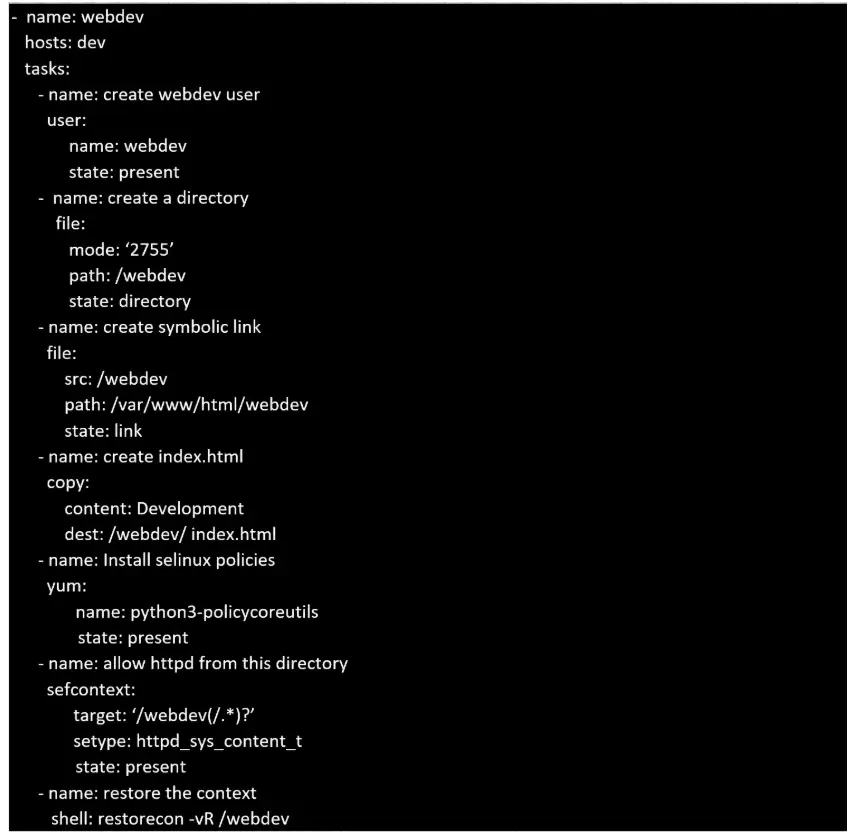
Drag & DropCreate a playbook called webdev.yml in ' home/sandy/ansible . The playbook will create a directory Avcbdev on dev host. The permission of the directory are 2755 and owner is webdev. Create a symbolic link from /Webdev to /var/www/html/webdev. Serve a file from Avebdev7index.html which display s the text " Development " Curl http://nod e1 . e xample.com/w e bd e v/index.html to test
Show Answer & Explanation Hide Answer & Explanation
Correct Answer
See the explanation for complete solution below:
Explanation
Solution as: