
Exam Overview
| Exam Code | Analytics-DA-201 |
| Exam Name | Salesforce Certified Tableau Data Analyst |
| Vendor | Salesforce |
| Total Questions | 174 |
| Last Updated | 26-Oct, 2026 |
Why CertsPoint?
- Latest & Verified Questions
- Detailed Explanations
- Regular Updates
- Full-Length Practice Tests
- Boost Your Exam Confidence
PDF Study Materials
Downloadable guides and resources
Practice Tests
Full-length tests with real exam experience
Progress Tracking
Monitor your performance and improvement
Study Anywhere
Access on desktop, tablet, and mobile
Secure Payment
Privacy Protected
Money Back Guarantee
Free Analytics-DA-201 Practice Questions
Explore 4 free practice questions for the Salesforce Analytics-DA-201 exam and review the answers and explanations to support your preparation.
-
Question 1
Single answerA colleague provides you with access to a folder that contains the following files: • Sates.csv • Bookl.twb • Sates.hyper • Export.mdb Which He contains an extract?
-
Option A:Correct
AExport mdb
-
Option B:Correct
Book1.twb
-
Option C:Correct
Sales.hype
-
Option D:Correct
Sales.csv
Show Answer & Explanation Hide Answer & Explanation
Correct Answer: C
Explanation
A .hyper file is an extract file that contains a snapshot of data from a data source. It is a compressed and optimized file format that can be used to improve the performance and portability of dashboards and workbooks. A .twb file is a workbook file that contains the visualization and connection information, but not the data itself. A .csv file is a comma-separated values file that contains plain text data. A .mdb file is a Microsoft Access database file that contains tables, queries, forms, and other objects. Reference: https://help.tableau.com/current/pro/desktop/enus/save_savework_packagedworkbooks.htm https://help.tableau.com/current/pro/desktop/enus/extracting_data.htm https://help.tableau.com/current/pro/desktop/en-us/examples_csv.htm https://support.microsoft.com/en-us/office/introduction-to-access-database-files-9f9a0f8c-9a3c4a0b-8e6c-6d1f1f7c2b7e In Tableau, a .hyper file is an extract file created by the Hyper database engine. It contains a snapshot of the data pulled into Tableau and is used to perform data analysis without the need for a live connection to the data source.
-
-
Question 2
Single answerYou publish a dashboard tut uses an attract. The extract refreshes every Monday at 10:00. You need to ensure that the extract also refreshes on the last day of the month at 18:00. What should you do?
-
Option A:Correct
From Tableau Desktop, open the Publish Workbook dialog box and configure the schedule.
-
Option B:Correct
From Tableau Serverselect the workbook select Refresh Extracts and then add a new extract refresh.
-
Option C:Correct
From Tableau Server. select Schedulesfind the schedule of the extract, and change the frequency to the Last day of the month
-
Option D:Correct
From Tableau Server.select Schedules and change the priority of the existing schedule
Show Answer & Explanation Hide Answer & Explanation
Correct Answer: B
Explanation
To refresh an extract on Tableau Server, you need to select the workbook,select Refresh Extracts, and then add a new extract refresh. You can specify the frequency and time of the refresh, as well as any custom options. You can have multiple extract refreshes for the same workbook with different schedules. Reference: https://help.tableau.com/current/server/en-us/refresh_extracts.htm https://help.tableau.com/current/server/en-us/refresh_extracts_add.htm On Tableau Server, you can manage the scheduling of extract refreshes by selecting the specific workbook and configuring additional refresh schedules as needed. This allows for multiple refresh triggers, such as the regular Monday at 10:00 AM schedule, as well as an additional trigger for the last day of the month at 18:00.
-
-
Question 3
Single answerYou have the following dashboard.
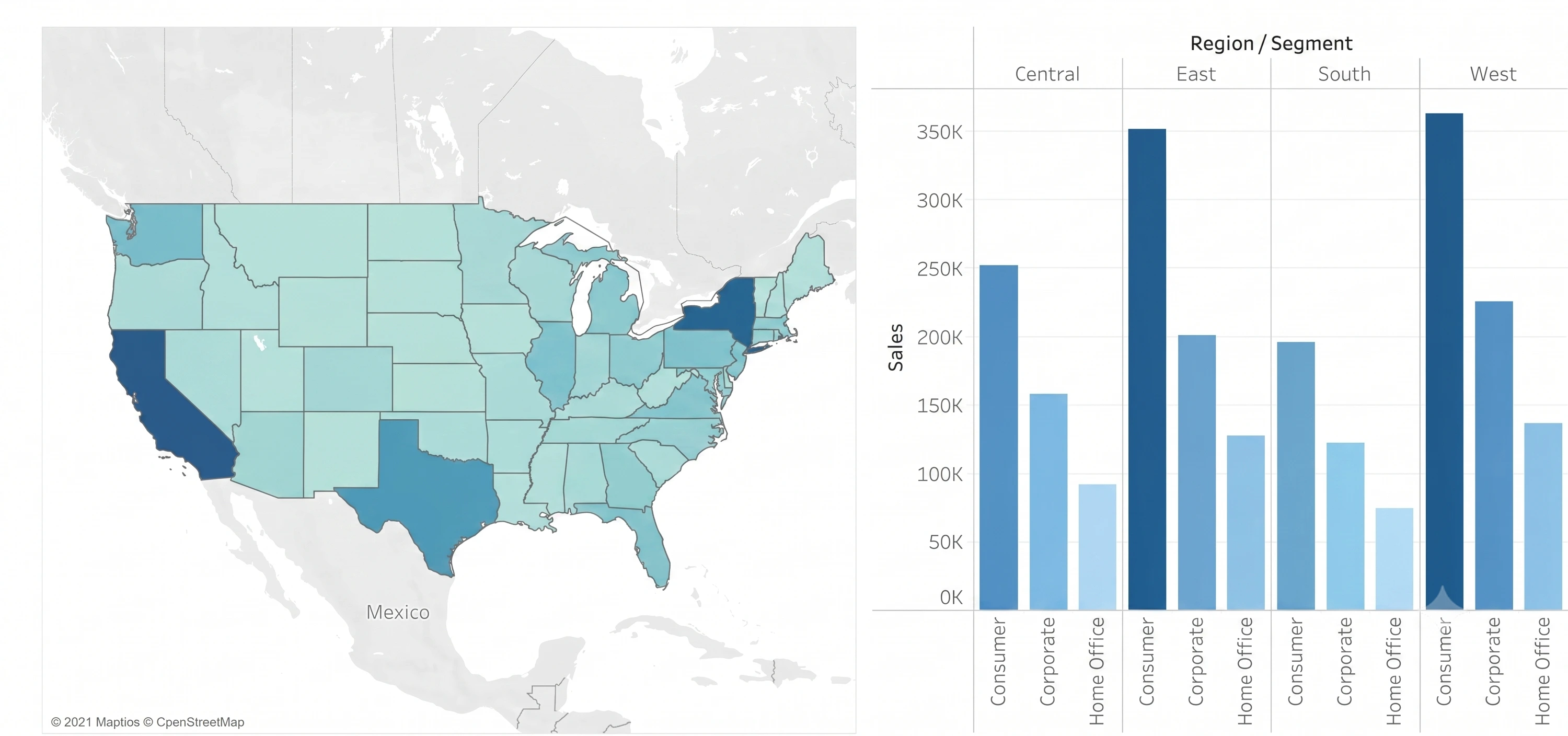
You want to show only one visualization at time. Users must be able to switch between visualizations. Whatshould you me?
-
Option A:Correct
A parameter and a calculated filed
-
Option B:Correct
Worksheet actions
-
Option C:Correct
Show/hide buttons
-
Option D:Correct
Dashboard actions
Show Answer & Explanation Hide Answer & Explanation
Correct Answer: C
Explanation
In Tableau, you can manage the visibility of different visualizations on a dashboard using various techniques. Among the options provided, the moststraightforward method to allow usersto switch between two visualizations is to use show/hide buttons. Here's why each option is or isn’t suitable for the requirement: A . A parameter and a calculated field: While it's possible to use a parameter and a calculated field to control which visualization is displayed, it requires creating a calculated field that responds to a parameter and then using that field to filter the view. This method can become complex and is not as user-friendly for simply showing and hiding visualizations. B . Worksheet actions: Worksheet actions in Tableau typically allow users to interact with the data within a visualization, such as filtering data or highlighting related data points when clicking or hovering. They are not designed to control the visibility of entire visualizations on a dashboard. C . Show/hide buttons: Show/hide buttons are a feature specifically designed to manage the visibility of dashboard elements. When you create a show/hide button, it can be configured to display or hide a particular visualization, container, or any other dashboard element when clicked. This provides a very intuitive interface for users to switch between visualizations. D . Dashboard actions: Dashboard actions, like worksheet actions, are used to create interactions between sheets, such as filtering data or navigating to other sheets or URLs based on user interactions. They are not intended for toggling the visibility of visualizations. Therefore, the correct answer is C. Show/hide buttons as they provide a user-friendly way to switch between visualizations on a dashboard without the need for complex calculations or actions that aren't meant for this purpose. The show/hide button feature is specifically designed for toggling visibility and offers a simple and effective solution for the requirement.
-
-
Question 4
Single answerYou have the following box plot thatshows the distribution of average profits made in every state by region.
Which region hasthe smallest distribution of profits?-
Option A:Correct
South
-
Option B:Correct
Cast
-
Option C:Correct
Central
-
Option D:Correct
West
Show Answer & Explanation Hide Answer & Explanation
Correct Answer: A
Explanation
The box plot visualization displaysthe distribution of average profits by region. The distribution of profits is represented by the range of the box (interquartile range) and the whiskers (which often represent the total range excluding outliers). From the image provided, the South region has the smallest visible range within its box and the shortest whiskers, indicating the smallest distribution of average profits among the choices provided.
-