
Exam Overview
| Exam Code | Desktop-Certified-Associate |
| Exam Name | Tableau Desktop Certified Associate |
| Vendor | Tableau |
| Total Questions | 108 |
| Last Updated | 26-Oct, 2026 |
Why CertsPoint?
- Latest & Verified Questions
- Detailed Explanations
- Regular Updates
- Full-Length Practice Tests
- Boost Your Exam Confidence
PDF Study Materials
Downloadable guides and resources
Practice Tests
Full-length tests with real exam experience
Progress Tracking
Monitor your performance and improvement
Study Anywhere
Access on desktop, tablet, and mobile
Secure Payment
Privacy Protected
Money Back Guarantee
Free Desktop-Certified-Associate Practice Questions
Explore 4 free practice questions for the Tableau Desktop-Certified-Associate exam and review the answers and explanations to support your preparation.
-
Question 1
Multiple answersHow to add reference lines in a view? (Select correct two answers)
-
Option A:Correct
Using Analytics pane
-
Option B:Correct
Using Data Pane
-
Option C:Correct
Using Analysis Menu
-
Option D:Correct
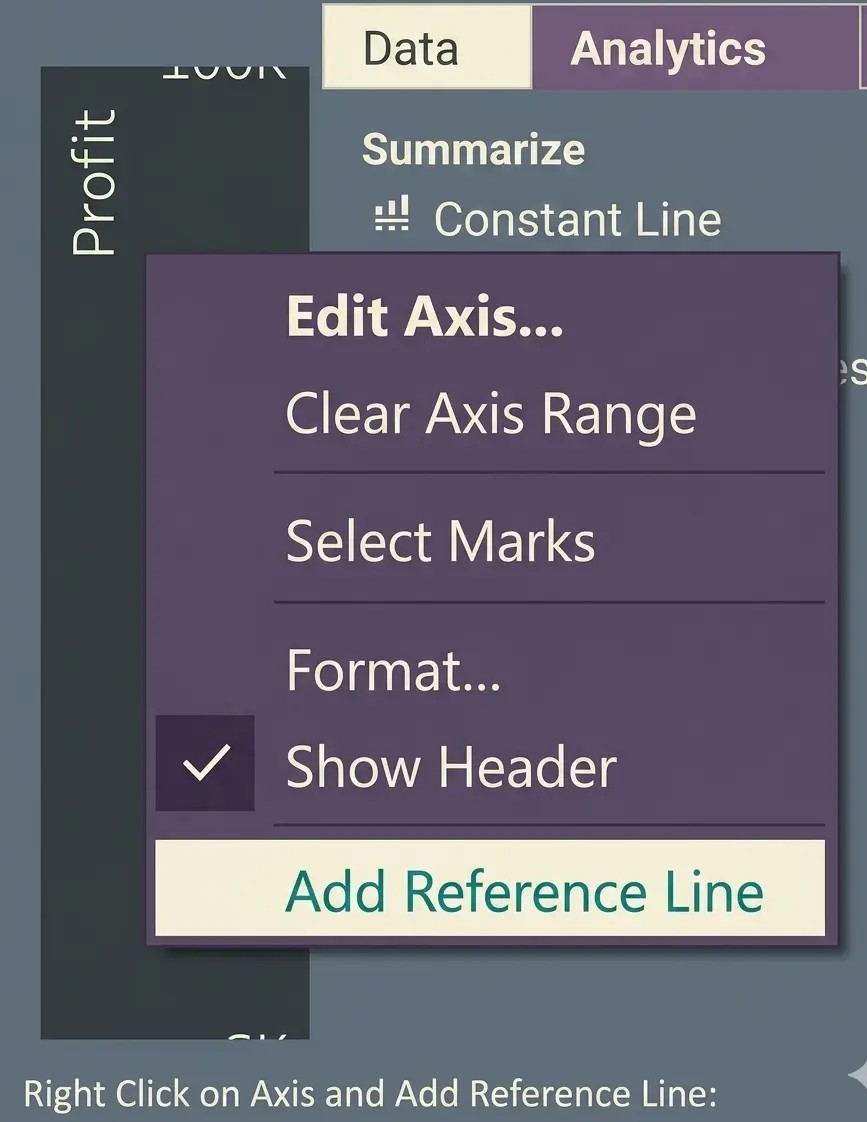
Right Click on Axis and Add Reference Line
Show Answer & Explanation Hide Answer & Explanation
Correct Answer: A, D
Explanation
Using Analytics pane:
-
-
Question 2
Multiple answersTo create a choropleth map, your data source should include the following types of
information?-
Option A:Correct
Quantitative or qualitative values
-
Option B:Correct
Location names or custom polygons
-
Option C:Correct
Background image
-
Option D:Correct
Custom Territories
Show Answer & Explanation Hide Answer & Explanation
Correct Answer: A, B
Explanation
-
-
Question 3
Single answerHow the ATTR() is defined in Tableau?
-
Option A:Correct
IF MIN ([dimension]) = MAX ([dimension]) THEN MIN ([dimension]) ELSE "*" END
-
Option B:Correct
IF MIN ([dimension]) = MAX ([dimension]) THEN MAX ([dimension]) ELSE "*" END
-
Option C:Correct
IF MIN ([dimension]) = MAX ([dimension]) THEN MIN ([dimension]) ELSE MAX ([dimension]) END
-
Option D:Correct
IF MIN ([dimension]) = MAX ([dimension]) THEN MIN ([dimension]) ELSE NULL END
Show Answer & Explanation Hide Answer & Explanation
Correct Answer: A
Explanation
In Tableau, the ATTR() (Attribute) function is used to return a value when all records in the current level of detail have the same value for a dimension. If there are multiple different values, Tableau displays an asterisk (*) to indicate that the value is not unique. Internally, ATTR() is defined as:
IF MIN([dimension]) = MAX([dimension]) THEN MIN([dimension]) ELSE "*" ENDThis logic works because if the minimum and maximum values of a dimension are the same, then all values must be identical, so Tableau returns that value. If the minimum and maximum values differ, it means multiple values exist, and Tableau returns an asterisk (*) instead. Therefore, Option A is correct. -
-
Question 4
Single answerIn which of the following scenarios you should use the blend?
-
Option A:Correct
The data to combine has the same structure but consists of data of different years.
-
Option B:Correct
The combined data will be used in many worksheets in the current workbook.
-
Option C:Correct
The data to combine is at a different level of detail.
-
Option D:Correct
All of the above.
Show Answer & Explanation Hide Answer & Explanation
Correct Answer: C
Explanation
Union - The data to combine has the same structure but consists of data of different years.
Blend - The data to combine is at a different level of detail. -