
Exam Overview
| Exam Code | TDA-C01 |
| Exam Name | Tableau Certified Data Analyst |
| Vendor | Tableau |
| Total Questions | 120 |
| Last Updated | 26-Oct, 2026 |
Why CertsPoint?
- Latest & Verified Questions
- Detailed Explanations
- Regular Updates
- Full-Length Practice Tests
- Boost Your Exam Confidence
PDF Study Materials
Downloadable guides and resources
Practice Tests
Full-length tests with real exam experience
Progress Tracking
Monitor your performance and improvement
Study Anywhere
Access on desktop, tablet, and mobile
Secure Payment
Privacy Protected
Money Back Guarantee
Free TDA-C01 Practice Questions
Explore 4 free practice questions for the Tableau TDA-C01 exam and review the answers and explanations to support your preparation.
-
Question 1
Single answerA colleague provides you with access to a folder that contains the following files:
• Sates.csv • Bookl.twb • Sates.hyper • Export.mdb Which He contains an
extract?-
Option A:Correct
Export mdb
-
Option B:Correct
Book1.twb
-
Option C:Correct
Sales.hyper
-
Option D:Correct
Sales.csv
Show Answer & Explanation Hide Answer & Explanation
Correct Answer: C
Explanation
A .hyper file is an extract file that contains a snapshot of data from a data source. It is a compressed
and optimized file format that can be used to improve the performance and portability of
dashboards and workbooks. A .twb file is a workbook file that contains the visualization and
connection information, but not the data itself. A .csv file is a comma-separated values file that
contains plain text data. A .mdb file is a Microsoft Access database file that contains tables, queries,
forms, and other objects. Reference: https://help.tableau.com/current/pro/desktop/enus/
save_savework_packagedworkbooks.htm https://help.tableau.com/current/pro/desktop/enus/
extracting_data.htm https://help.tableau.com/current/pro/desktop/en-us/examples_csv.htm
https://support.microsoft.com/en-us/office/introduction-to-access-database-files-9f9a0f8c-9a3c-
4a0b-8e6c-6d1f1f7c2b7e -
-
Question 2
Single answerYou publish a dashboard tut uses an attract. The extract refreshes every Monday at 10:00.
You need to ensure that the extract also refreshes on the last day of the month at 18:00.
What should you do?-
Option A:Correct
From Tableau Desktop, open the Publish Workbook dialog box and configure the schedule.
-
Option B:Correct
From Tableau Server select the workbook select Refresh Extracts and then add a new extract
refresh -
Option C:Correct
From Tableau Server. select Schedules find the schedule of the extract, and change the frequency
to the Last day of the month -
Option D:Correct
From Tableau Server. select Schedules and change the priority of the existing schedule
Show Answer & Explanation Hide Answer & Explanation
Correct Answer: B
Explanation
To refresh an extract on Tableau Server, you need to select the workbook, select Refresh Extracts, and
then add a new extract refresh. You can specify the frequency and time of the refresh, as well as any
custom options. You can have multiple extract refreshes for the same workbook with different
schedules. Reference: https://help.tableau.com/current/server/en-us/refresh_extracts.htm
https://help.tableau.com/current/server/en-us/refresh_extracts_add.htm -
-
Question 3
Single answerYou want to show only visualization at time. Users must be able to switch between visualizations.
What should you me?-
Option A:Correct
A parameter and a calculated filed
-
Option B:Correct
Worksheet actions
-
Option C:Correct
Showhide buttons
-
Option D:Correct
Dashboard actions
Show Answer & Explanation Hide Answer & Explanation
Correct Answer: C
Explanation
Showhide buttons are a feature that allows you to show or hide a layout container on a dashboard.
You can use showhide buttons to create a toggle effect that switches between two visualizations. You
need to place each visualization in a separate layout container and then add a showhide button for
each container. You can customize the appearance and behavior of the buttons to suit your needs.
Reference: https://help.tableau.com/current/pro/desktop/enus/
dashboards_organize_floating_layoutcontainers.htm
https://help.tableau.com/current/pro/desktop/en-us/dashboards_showhide.htm -
-
Question 4
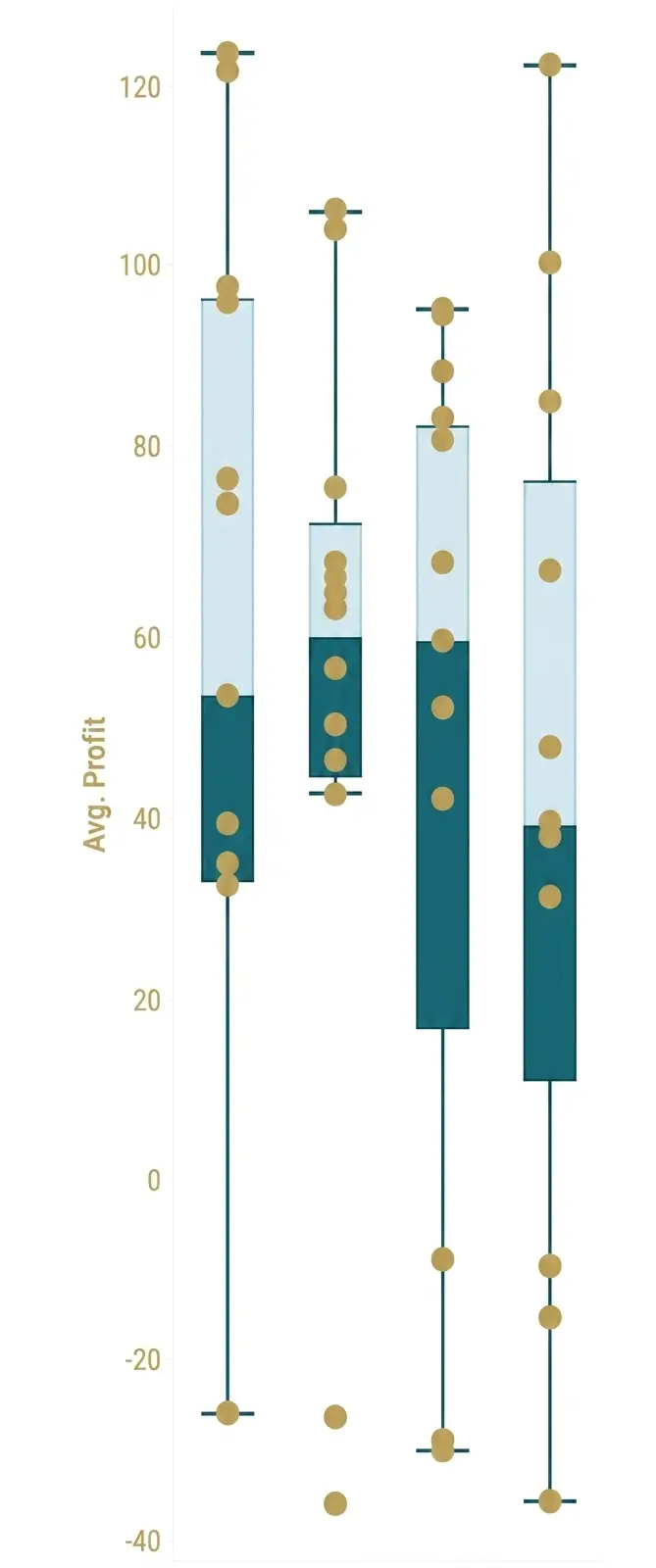
Single answerYou have the following box plot that shows the distribution of average profits made in every state by
region.Which region has the smallest distribution of profits?
-
Option A:Correct
South
-
Option B:Correct
Cast
-
Option C:Correct
Central
-
Option D:Correct
West
Show Answer & Explanation Hide Answer & Explanation
Correct Answer: C
Explanation
The central region has the smallest distribution of profits because it has the smallest interquartile\
range (IQR), which is the distance between the first and third quartiles of the box plot. The IQR
measures the spread of the middle 50% of the data. The smaller the IQR, the less variation in the
data. Reference: https://help.tableau.com/current/pro/desktop/en-us/buildexamples_boxplot.htm
https://www.statisticshowto.com/probability-and-statistics/interquartile-rang -